iOS 26 Brings Smart Call Screening: 5 Easy Ways iPhone Users Can Stop Spam Calls

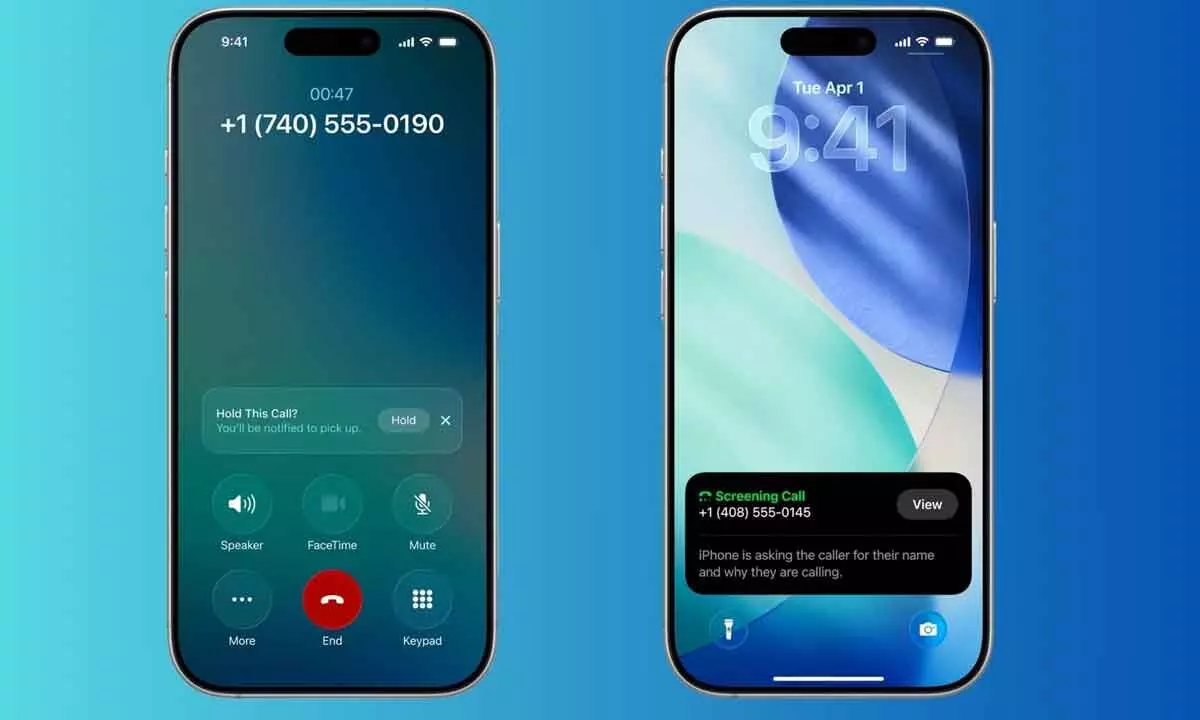
Apple’s iOS 26 introduces smarter call screening tools that help iPhone users automatically detect, filter, and block annoying spam calls.
Spam calls have become an everyday frustration, interrupting meetings, disturbing personal time, and often arriving at the most inconvenient moments. Whether you use an iPhone, Android device, or even a basic phone, these unwanted calls seem impossible to escape. Now, Apple is stepping up with new tools in its latest iOS update to make life easier for iPhone users.
With the release of iOS 26, Apple hasn’t just refreshed the design and interface — it has quietly introduced practical features aimed at reducing spam calls. While flashy changes like the Liquid Glass design grabbed headlines, the enhanced call protection system may be one of the most useful additions for everyday users.
Here’s how iPhone users can take advantage of the new tools to keep spam callers away.
1. iOS 26 Release
The iOS 26 update marks one of Apple’s most significant software upgrades in recent years. Beyond visual improvements and performance enhancements, the update includes better call management capabilities that focus on privacy and convenience. Spam call filtering is among these underrated yet highly impactful features.
2. Call Screening Is Here
Apple has introduced an intelligent Call Screening feature that works almost like a virtual assistant. Instead of you picking up an unknown number, the system answers it using a robotic voice. It asks callers to explain why they are calling. You can watch the conversation unfold in real-time through a text transcript and decide whether the call is worth answering. This way, you stay in control without directly engaging with potential scammers.
3. Set It Up For Your iPhone
Activating the feature is simple. Head to Settings, tap on Apps, then Phone, and find the option to screen unknown callers. Select Ask reason for calling to enable it. Once turned on, your iPhone will automatically handle suspicious or unfamiliar calls on your behalf.
4. More Options Available
The screening system also offers extra flexibility. You can block unknown numbers entirely, allow only saved contacts to reach you, or filter calls based on your preferences. However, be cautious — strict blocking could mean missing important calls, such as deliveries or medical appointments.
5. Some Third-Party Options
For users who want additional layers of protection, third-party apps are still available. Services like RoboCaller, Hiya and Truecaller can help identify and filter spam calls. While they may not be as powerful on iOS as on Android, they still offer decent support.
In short, iOS 26 gives iPhone users smarter tools to reclaim their peace from persistent spam callers — making everyday communication safer and far less stressful.