IMEI Unlock Check: How to Know If Your Phone Can Be Unlocked Legally

Learn how to perform an IMEI unlock check to find out whether your phone can be legally unlocked, what factors matter, and how to avoid risks before unlocking your device.
Unlocking your phone without its IMEI is difficult. People sometimes switch providers or buy used phones without checking IMEI unlock. This causes network difficulties, blocked signals, and false unlock services.
The good news is that you can avoid all of this by running an IMEI Unlock Check. With one number, you can learn if your phone is locked, unlocked, blacklisted, or eligible for a legal carrier unlock. This guide explains IMEI, why it matters, and how Dr.Fone imei check makes it easy, legal, and safe.
What Is an IMEI and Why It's Key for Unlocking
Unlocking phones requires IMEI numbers. Each phone is unique, like fingerprints. International Mobile Equipment ID. Mobile networks identify devices with this 15-digit number. Consider it your phone's mobile serial number.
IMEIs affect network access, security, and unlocking. The phone's contract, network lock, loss, or theft are reported to carriers. The carrier will check your IMEI before unlocking.
The IMEI helps verify:
- Who owns the phone
- Whether it is blacklisted
- Whether it can be legally unlocked
- What network is it tied to
- Whether it has unpaid bills or contract issues
What Does "IMEI Unlock Check" Mean?
Let's examine what an unlock check reveals. By performing an IMEI Unlock Check, it can be known whether a given device is unlocked in a legal manner or not. This tool also points out the entity which has the lock and which requirements should be fulfilled in order to take the handset to a different network. To understand this, distinguish between carrier and device locks:
- Carrier Lock: Phone may only function on the network it was purchased on (e.g., Verizon, AT&T, T-Mobile). This limit is lifted by unlocking.
- Device Lock: Security locks like Apple's Activation Lock, Samsung's KNOX Guard, or company-specific MDM locks. Non-carrier locks cannot be overcome lawfully without permission.
A legal unlock is done by the carrier after checking your IMEI. Illegal unlocking involves bypass tricks and fake software, which are unsafe and may break your phone.
An IMEI Unlock Check helps you see:
- If the phone is carrier-locked
- If it is eligible for unlocking
- If it is blacklisted
- If it has iCloud/Google/MDM locks
- If it has a warranty left
You can run all these checks easily with Dr.Fone IMEI Check, which gives fast and detailed results for both Android and iPhone.
How to Do an IMEI Unlock Check with Dr.Fone IMEI Check
The unlocking process starts with a simple IMEI lookup. The Dr.Fone IMEI Check. Your phone's unlock, blacklist, carrier lock, warranty, KNOX, iCloud, Google FRP, and other locks are checked online. It works with Samsung, Huawei, Xiaomi, OPPO, VIVO, Motorola, and Apple Android and iOS phones.
Key Features
- Works with Android and iPhone
- First IMEI check is free
- Fast results (1–60 seconds)
- 20+ device checks in one place
- Accurate carrier lock and unlock eligibility info
- Supports KNOX, MDM, iCloud, and Google FRP checks
- No data stored — IMEI used only for checking
Step 1: Locate Your IMEI Number
You can find your IMEI in many simple ways:
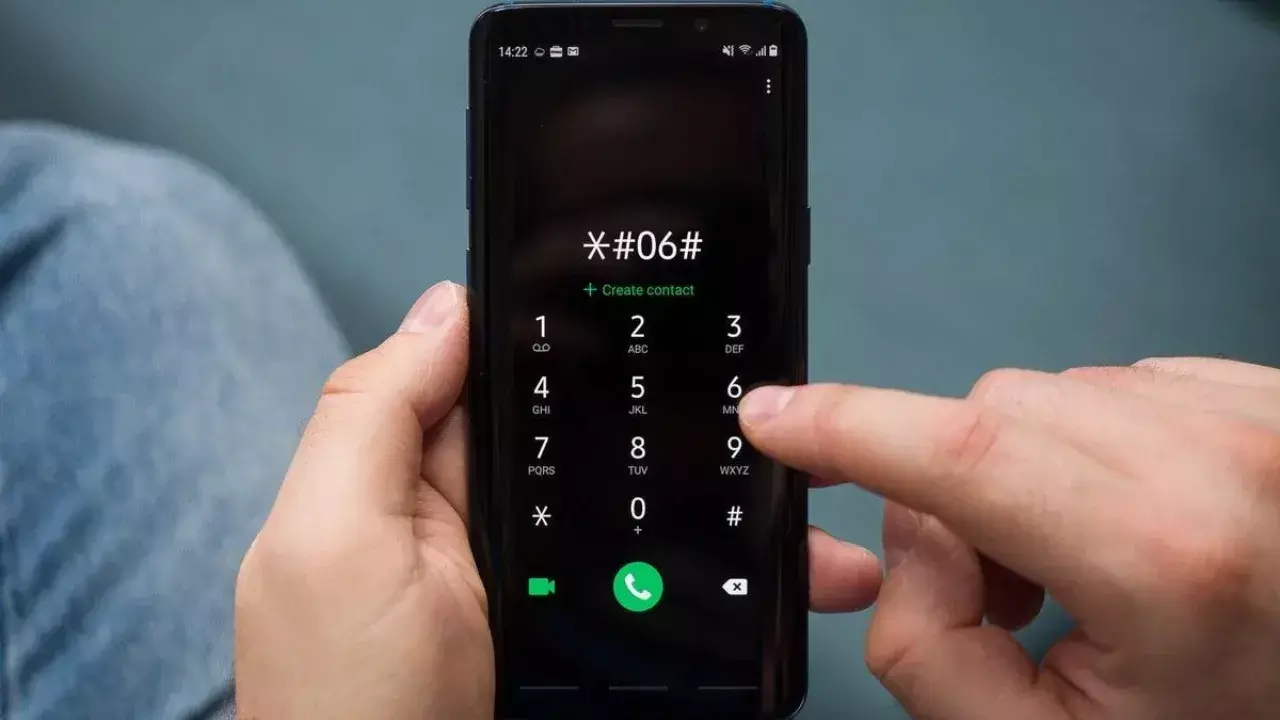
- Dial "*#06#" on your phone.
- Go to "Settings > About Phone."
- Check the SIM tray or the original box.
Make sure to copy the number carefully. A single wrong digit can change the results.
Step 2: Go to the Dr.Fone IMEI Check Page
Open your browser and visit the Dr.Fone IMEI Check tool page. Choose from the available options such as Blaclist check, Activation Lock Status etc.
Step 3: Enter the IMEI and Start Your Check
Paste the IMEI into the box and select your device type. Then click "Check Now." Your first check is free, and no login is required.
Step 4: Review Your IMEI Results
A detailed report will arrive shortly. Click "Save Report." This includes:
- Check carrier lock status: Is your phone locked or unlocked?
- Unlock eligibility: Can it be legally unlocked?
- Blacklist status: Lost, stolen, or clean
- Warranty info
- Device details: Model, brand, storage, region
- KNOX Guard status (Samsung)
- iCloud Activation Lock (iPhone)
- Google FRP Lock (Android)
- MDM Lock
Understanding Unlock Eligibility
After your check, you must understand the rules that decide if your phone can be unlocked.
- Carriers often have unlock rules. Many demand the phone to be active on the network for several days, paid off, and linked to a good account.
- Blacklisted phones cannot be unlocked. Identified as stolen, lost, or fraudulent. Carriers won't unlock such devices.
- iPhones may require the removal of Activation Lock. Samsung devices may need KNOX Guard to be off. Some Android phones need FRP disabled before unlocking.
- Imported phones may not follow local unlock rules. An IMEI Unlock Check helps you know if your international device can work on your carrier.
Why You Should Use an IMEI Unlock Check Tool
Instead of guessing, use a tool to stay safe and informed.
An IMEI Unlock Check tool keeps you safe from scams and bad purchases. It helps you:
- Avoid illegal unlocking services
- Know your carrier rules before paying
- Check the blacklist and warranty
- Verify Activation Lock, KNOX, and MDM
- Save time with one simple test
Dr.Fone makes this easy by giving clear, fast results from one IMEI.
Tips for Unlocking Your Phone Legally
Follow these methods to unlock your device properly.
- Make sure to do an IMEI Unlock. Before buying an old phone, check
- Contact your carrier if you are eligible for a free unlock
- Avoid unofficial unlock hacks or software
- Make sure your phone is not blacklisted
- Remove iCloud/FRP/MDM locks before unlocking
- Keep proof of purchase for carrier verification
- Use only trusted tools like Dr.Fone to check IMEI status
Conclusion
You can easily check if your phone may be legally unlocked with an IMEI Unlock Check. It prevents scams, fake unlock services, and non-network-compatible phones. This IMEI number shows if your device is locked, eligible, prohibited, or restricted by security locks. By providing clear results in seconds, Dr.Fone IMEI Check makes the process fast, safe, and beginner-friendly. Check your IMEI before moving providers or buying a used phone. The best way to confidently unlock your device.