7 Best Disk Cloning Software Tested in 2026: One Surprising Winner

Worried about disk migration? Discover the best disk cloning software tested in 2026, compare top tools, and see why 4DDiG stands out.
Upgrading to a new SSD should be an exciting experience, but for most people, it’s actually stressful. The thought of losing years of files, a perfectly tuned Windows setup, or a failing hard drive finally giving up is enough to cause panic. Disk cloning solves this by copying your entire digital life exactly as it is. With so many tools claiming to be the best disk cloning software, choosing the wrong one can mean wasting time or failed boots.
After testing leading SSD cloning software hands-on, one solution stood out.
What We Looked For? Evaluation Criteria To Keep In Mind
To ensure this comparison is practical and trustworthy, we tested each disk cloning software using the same real-world scenarios. These criteria reflect what actually matters when you’re migrating a system or rescuing data.
- Speed & Performance: How long does it take to clone a standard system drive?
- Ease of Use & Interface: Whether beginners can complete a clone without guides.
- Feature Set & Flexibility: Support for OS migration, data-only cloning, and disk imaging.
- Reliability & Success Rate: Whether the cloned drive boots correctly without fixes.
- Value for Money: Features offered versus price.
This transparent approach helps separate marketing claims from actual performance.
The Head-to-Head Review
Here is the in-depth comparison of the 7 best disk cloning software options you can try:
1. 4DDiG Partition Manager
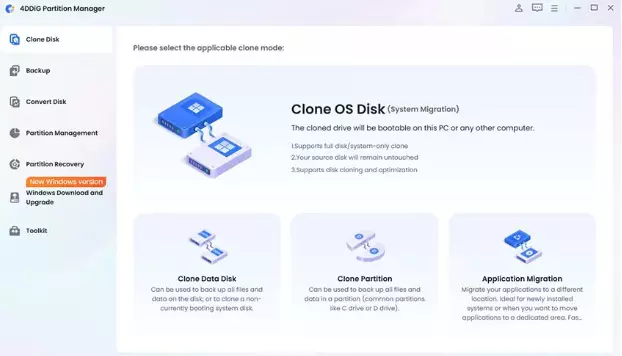
4DDiG Partition Manager is designed specifically to simplify disk cloning while maintaining professional-level reliability. Its wizard-driven interface walks users through the entire cloning process, making it accessible even for first-time SSD upgrades.
Unlike many competitors, it balances speed, clarity, and versatility without overwhelming users with unnecessary features. Beyond cloning, it also functions as a complete partition management toolkit, making it a strong all-in-one solution for modern storage upgrades.
Pros
- Extremely intuitive wizard-driven design
- Fast and reliable cloning
- Excellent value for features offered
Cons
- Windows-focused (no native macOS cloning)
- Lesser-known brand (but impressive performance)
Best for:
Most home users and enthusiasts
2. Acronis True Image
Acronis True Image is a well-established disk cloning and backup solution widely used by professionals and enterprises. It combines full-disk cloning with advanced backup, ransomware protection, and cloud storage features, making it more than a simple cloning tool.
Pros
- Excellent reliability and security features
- Supports disk imaging and cloud backups
- Strong enterprise reputation
Cons
- Expensive subscription model
- Overkill for simple cloning needs
- Steeper learning curve
Best for:
Advanced users and businesses needing a full backup suite often searched for an Acronis alternative due to cost concerns.
3. Macrium Reflect (Free & Paid)
Macrium Reflect is known for its dependable cloning engine and strong reputation among Windows power users. It supports disk cloning and disk imaging with a focus on stability and precision, which is why it has long been recommended for system migrations.
Pros
- Highly reliable cloning engine
- Free version available for basic use
- Excellent documentation
Cons
- Interface feels technical
- Free version lacks automation
- Slower than modern competitors
Best for:
Tech-savvy users wanting a trusted free option
4. Clonezilla
Clonezilla is a powerful open-source hard drive cloning software, but it’s not beginner-friendly. It supports a wide range of file systems and operating systems, offering impressive flexibility for complex cloning environments.
Pros
- Completely free and open-source
- Extremely powerful under the hood
- Works across multiple OS platforms
Cons
- Text-based interface
- No live system cloning
- High risk of user error
Best for:
Linux admins and advanced users on a budget
5. EaseUS Todo Backup
EaseUS Todo Backup is a popular choice for home users thanks to its clean interface and guided workflows. It offers disk cloning, system backup, and recovery features that make it approachable for users with little technical experience.
Pros
- User-friendly interface
- Supports disk cloning and imaging
- Good documentation
Cons
- Key features locked behind a paywall
- Slower cloning speeds
- Upgrade prompts can be intrusive
Best for:
Casual users needing guided backups
6. AOMEI Backupper
AOMEI Backupper positions itself as a flexible disk cloning and backup solution for Windows users. It supports system cloning, disk cloning, and partition management through a relatively simple interface that balances usability and control.
Pros
- Simple UI for beginners
- Supports OS migration
- Competitive pricing
Cons
- Some advanced features are locked
- Performance varies on large disks
- Ads in the free version
Best for:
Budget-conscious Windows users
7. MiniTool Partition Wizard
MiniTool Partition Wizard is primarily known for its partition management capabilities, with disk cloning offered as an additional feature. Users often turn to it when managing disk layouts alongside basic cloning operations.
Pros
- Strong partition tools
- Familiar interface
- Works well for basic cloning
Cons
- Cloning is not its main focus
- Paid version required for OS migration
- Slower performance
Best for:
Users already managing partitions
Deep Dive: Why 4DDiG Partition Manager is the Surprising Winner
After reviewing the competition, a pattern emerged: most tools excel in one area but fail in another. 4DDiG Partition Manager consistently addressed the most common pain points users face.
Pain Point: Complexity
Many cloning tools assume technical knowledge.
4DDiG’s Answer: A clean, wizard-based interface that guides users step by step, making it easy to clone a hard drive without mistakes.
Pain Point: Cost
Enterprise tools are expensive, while free tools are limited.
4DDiG’s Answer: Professional-grade SSD cloning software at a highly competitive one-time price.
Pain Point: Versatility
Users often need more than cloning.
4DDiG’s Answer: Beyond cloning, it’s a complete partition toolkit, resize, merge, split, or wipe disks after migration.
Pain Point: Reliability
A cloned drive that won’t boot defeats the purpose.
4DDiG’s Answer: In testing, it consistently produced bootable drives without extra repair steps.
Mini Case Study:
Cloning a 500GB Windows 11 laptop drive to a new NVMe SSD took under 45 minutes, and the system booted successfully on the first attempt. No BIOS tweaks, no troubleshooting.
This balance of speed, clarity, and reliability is why it earns the top spot as the best disk cloning software for most users.
Final Recommendations: Choosing What’s Right for You
Best Use Case | Recommended Tool |
Total Beginners & Best Value | 4DDiG Partition Manager |
Enterprise & Advanced Users | Acronis True Image |
Free Open-Source Tool | Clonezilla |
Simple Free Windows Cloning | Macrium Reflect Free |
While every tool has its place, 4DDiG Partition Manager offers the best balance of ease, reliability, and affordability, making it the top choice for most people looking to migrate to SSD or clone Windows 10/11 systems.
FAQ
Is disk cloning better than a fresh install?
Yes, cloning preserves your OS, settings, and apps, saving hours of setup time.
Can I clone a larger HDD to a smaller SSD?
Yes, as long as the used space fits. Tools like 4DDiG handle intelligent resizing automatically.
Does disk cloning software work with macOS or Linux?
Most tools here focus on Windows. macOS and Linux require platform-specific solutions.
What’s the difference between cloning and imaging?
Cloning creates a bootable copy immediately. Imaging creates a backup file that must be restored later.
Conclusion
Upgrading storage or replacing a failing drive doesn’t have to be stressful. The best disk cloning software turns a risky operation into a smooth transition. After extensive testing, 4DDiG Partition Manager stands out by combining speed, simplicity, and reliability, making it the smartest choice for most users in 2026.